

ChatGPT AI Agents: What Actually Works (And What Doesn’t)
So last year I was drowning. Like, seriously drowning. I’d wake up at 6 AM, check emails, spend three hours making presentation decks that nobody really looked at carefully anyway, then jump into data analysis work that had me squinting at Excel sheets until my eyes hurt.
By the time I got to actual meaningful work the stuff that actually mattered for HostGet where I work it was already 2 PM and I was exhausted. My buddy Mark kept telling me I needed to work smarter, not harder. I’d just roll my eyes. But then I actually sat down one Saturday and tracked what I was doing with my time.
You know what I found? I was spending like 40+ hours every single week on stuff that a machine could literally do better than me. That’s when I started messing around with ChatGPT agents. Not like regular ChatGPT. This was different.
Okay, So What’s an Agent Actually?
I had to figure this out the hard way because nobody really explains it in plain English. An agent is basically ChatGPT, but with hands. Like, it can actually go out and do stuff. It can open websites, click buttons, read data, create files, send emails actual work.
You need ChatGPT Plus ($20/month) or Pro ($200/month) to use them. I went with Plus first to test it out. Takes like thirty seconds to turn it on just click Tools, then Agent Mode.
Fair warning: Plus gives you 40 uses per month. Pro gives you 400. I learned quickly not to waste these on random experiments. That was dumb on my part.
The First Time I Actually Saw This Work
I was prepping for this board meeting, right? The kind where you need a solid presentation about AI ROI for small businesses. Usually this means I’m up until 11 PM digging through reports, finding statistics, making slides look decent. It’s tedious as hell.
I thought, fuck it, let me try this agent thing. I typed:
“Make me a presentation about AI ROI for small businesses. Find real data, case studies, actual numbers on costs and returns. Make it look professional for talking to a board.”
I hit enter. Went to make coffee. Came back like 20 minutes later and it was done. Not a rough draft. A finished presentation. With charts. With actual current data it pulled from real industry reports. With case studies that matched what I was seeing in the field.
I literally stared at my screen for like two minutes just refreshing it to make sure it wasn’t some glitch. It wasn’t. That presentation would have taken me 4-5 hours easy. Sometimes longer if I got stuck finding the right data.
This took twenty minutes and it was honestly better than I would have made it. That’s when I was like… okay, there might be something here.
The Ones I Actually Use Every Single Week
1. Presentations (This One Changed My Life, No Joke)
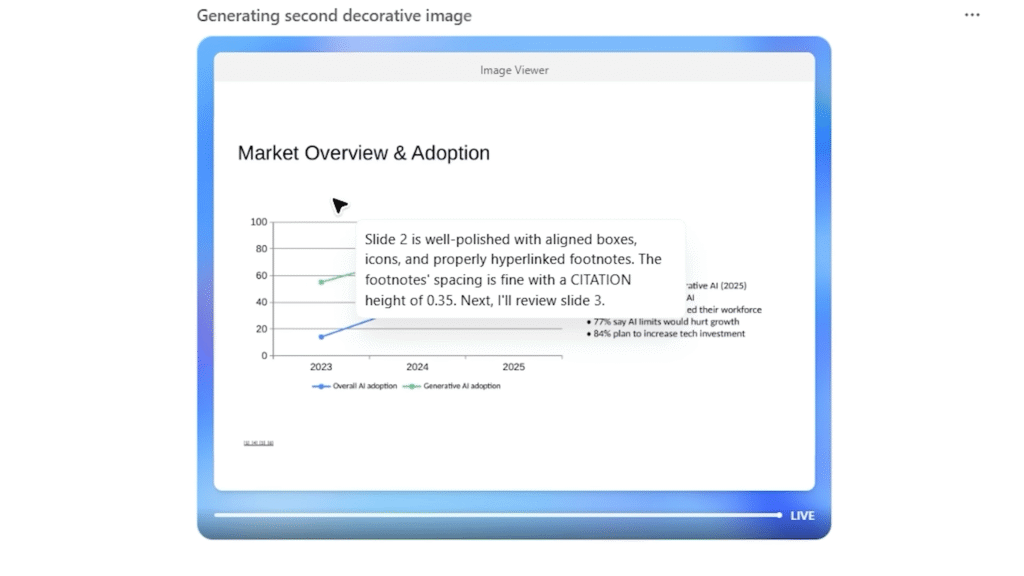
After that first time, I started using this one constantly. Whenever I need to create anything that needs visuals and data, I throw it at the agent.
The thing that shocked me is how specific you can get. If my company has brand colors or a specific way we like things designed, I just tell the agent. It actually follows it. Not perfectly every time, but close enough that I only need to tweak a couple things instead of rebuilding everything.
I’ve used this for internal team presentations, client pitches, board meetings, quarterly reviews. I probably do this 2-3 times a week now. Saves me easily 15 hours a month.
2. Data Stuff (Because I Hate Excel)
Okay, I’ll be honest. I’m not bad with data, but I absolutely hate the busy work part. Setting up pivot tables, creating dashboards, filtering everything a thousand different ways. Brain numbing.
One day I had customer data from our marketing campaigns and I was just… staring at it, not wanting to dive in. So I asked the agent:
“Here’s customer engagement data from different campaigns. Make me an Excel dashboard where I can actually see what’s working. Show ROI by channel, customer trends, what we should focus on. Then make a summary I can show the team.”
It came back with an interactive dashboard that actually lets you filter by dates and campaign types. Not some static thing. Actual working filters. Then it gave recommendations about which channels were performing best and where we were wasting money.
I ran the numbers myself to verify and it was right. I probably saved 8 hours just that week. And I use this monthly now.
3. Watching My Competition (Sneaky But Legal)
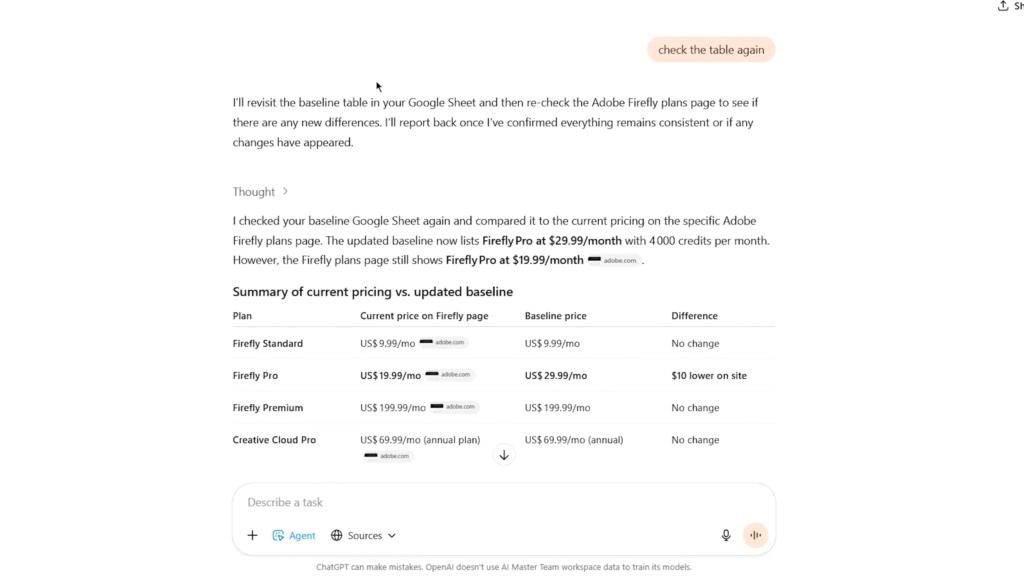
This is my favorite one because it feels like having spy software. I created a simple spreadsheet with what my competitors are charging and what features they offer. Then I told the agent to watch their websites and tell me the second something changes.
“Check competitor pricing pages. Compare to my spreadsheet. If anything is different, tell me what changed and what it might mean for us.”
Now every Monday morning I wake up to a report that’s like “Hey, competitor X dropped their prices by 15%. Here’s what you could do about it.”
It’s the kind of information that normally requires paying some expensive consultant. I get it automatically because I set it up one time.
4. Blog Posts and Content
This one’s been huge for me because I do a lot of content work for HostGet. The research part always kicked my ass. Finding actual sources, finding recent statistics, making sure I’m not just making stuff up.
I wrote something like: “Find what’s actually happening with AI in small business right now. Real statistics, real companies using it, real problems people are solving. Then write a blog post that makes us look like we know what we’re talking about.”
The agent went out, found actual data, found actual case studies, and wrote something that sounded like a real person, not a robot. I had to tweak a few things and add some of my own voice, but the research was solid and the framework was already there.
Used to take me 6-8 hours per blog post. Now it’s like 2 hours because I’m mostly just personalizing what’s already there.
5. Building Simple Apps (Yes, Really)
Okay, this one sounds crazy, but I swear it works. I needed a simple landing page that collected emails, stored them in Google Sheets, and sent a welcome email automatically. Normally that means hiring someone or spending days figuring out no-code platforms.
I asked the agent to build it. And it did. It actually built a working prototype that I could use. I use this maybe once a month, but when I need it, it saves me like a week of time that I’d spend either coding or hiring someone.
6. Researching Companies for Outreach
This one’s been useful for business development conversations I’m having. I gave the agent a list of 20 companies and said: “Find out what these companies actually do, what’s happening with them right now, who makes decisions there, and what problems we could actually help them solve.
Then write me a message to their decision maker that sounds like I actually know something about their company.” It researched each one. Found recent press releases, figured out who runs them, and wrote personalized messages that don’t sound generic. Way better response rates than my old spray and pray approach.
7. Strategic Thinking Stuff
This is the weird one because it’s kind of like having a consultant in your computer. I asked it to do competitive analysis. Like, actually competitive analysis who are we competing with, what are they good at, what are they bad at, where’s the actual opportunity for us.
It came back with something that would normally cost thousands of dollars from an actual consulting firm. Executive summary, competitor profiles, market opportunities, actual recommendations. Is it perfect? No. But it’s a solid starting point and it makes me think differently about our positioning.
How I Actually Made This Work Without Losing My Mind
Okay so here’s the real thing I could have tried to automate everything at once and just wasted all my monthly tasks on garbage.
Instead, I did this:
First, I picked the thing that annoyed me most. For me, it was presentations. Every week I was making them and hating my life. So I started there and really figured out how to make that agent do exactly what I needed.
Then I stopped fiddling and just used it. Once I figured out what worked, I saved that prompt and stopped experimenting. I know that sounds boring, but I was wasting tasks trying random stuff.
I set recurring tasks for the stuff that repeats. Like, competitor monitoring runs every Monday. My team emails run every Friday. I don’t have to think about it.
I actually saved my best prompts. I have a little document with prompts that worked. When I need to do something again, I just pull from that instead of writing it from scratch every time.
I integrated this into how I already work. I didn’t create some separate workflow. This is just part of how I do my job now.
Real Talk About What This Actually Means for Me
Honestly? I went from being frustrated and tired to actually having breathing room in my day. I’m not exaggerating. That 40 hours a week of repetitive stuff? It’s gone. Or at least most of it is. That means I can actually think about bigger picture decisions instead of being stuck in execution mode.
I have more time with my team. I’m not looking at my phone at 10 PM feeling stressed about what I have to do tomorrow. I’m actually present when I’m home instead of mentally checking off tasks in my head.
The work quality is weirdly better too. An AI doesn’t get tired and make careless mistakes on a presentation at midnight. It just does it the same quality every single time. That’s kind of nice, even if I hate admitting it.
The Stuff That Doesn’t Work
I don’t want to sound like I’m selling this. It’s not magic. Sometimes the agent makes up information. Especially when you ask it about really niche stuff. So you still gotta check things, especially with data or numbers.
Sometimes a prompt doesn’t work and you have to rewrite it a few times. That’s frustrating but it’s not that hard. And yeah, you’re limited on how many times you can use it each month, so you can’t go crazy. That’s actually good though forces you to be intentional instead of just automating random crap.
Also, like, the agent can give you analysis and recommendations, but you still gotta actually think about it. You can’t just blindly follow what it says. You need actual judgment, which is the human part.
Where I’d Actually Start If I Was You
Don’t try to do all seven. That’s too much. Look at your week. What’s one thing you do that’s mind-numbing? That takes hours? That you’d pay someone else to do if you could afford it? That’s your starting point. Maybe it’s presentations like me. Maybe it’s data work. Maybe it’s research. Pick that one thing. Spend a week or two actually using that agent.
Figure out what works. Get good at it. Then expand to the next thing. Honestly, if you do that, within like three months you’ll have freed up probably 20-30 hours a month. And that’s life changing if you actually use that time for real work instead of just scrolling.
The Real Situation
Look, I’m not some AI evangelist. I’m a cloud engineer who got tired of wasting time on repetitive bullshit. These agents are tools. They’re not magic. But they actually work, and they’ve genuinely changed how I spend my time at work.
Your competitors probably aren’t using them yet. Or if they are, they’re still figuring it out. That window won’t stay open forever. If you’re doing hours of manual work every week that a computer could do, why are you still doing it? That doesn’t make sense anymore. Start this week. Pick one agent. Try it. See what happens.